Let’s get TORO working offline
Your internet or TORO Cloud is having trouble. Nothing is broken. You can keep ringing up sales — just change one number in one file by following the steps below.
TORO Cloud is what hosts the Billing and Module Access. You might receive a message that says “NO ACCESS TO PAID MODULES” once you do the work around below. This will not impact sales for the day. The only thing that might be restricted is the sending of SMS.
First, which one is happening?
This tells you the number to type in Step 4 below.
Your internet is completely out
Your internet is running slowly
TORO Cloud is DOWN
Your internet works, but TORO cannot reach TORO Cloud.
- 1
Find the yellow folder at the bottom of the screen.
Along the very bottom of the screen is a row of small pictures. Find the one that looks like a yellow folder and click it one time — a window will open.Do not see a folder down there? On the keyboard, hold the Windows key(the key with the four-square window picture, to the left of the space bar) and press the letter E.
- 2
Click the address bar and type this, then press Enter.
Near the top of that window is the address bar. In the picture below it has a red box around it. Click inside it one time, type these exact letters, then press the Enter key: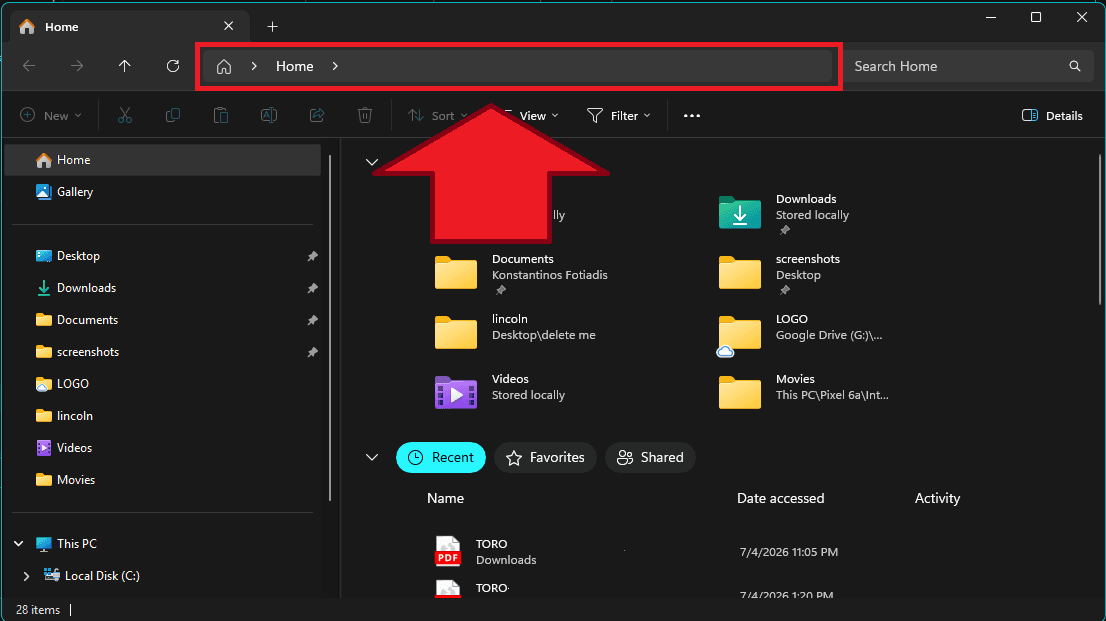 c:\hellasbae
 - 3
Find “internet” and open it.
A list of items appears. Find the one named internet. Point your mouse at it and click twice quickly (a double-click) to open it. It opens in a plain white notepad.internet - 4
Change the LAST line to your number.
Look at the very last line of the file. It is a single number, and right now it is a 0. Change that 0 to the number for your situation from above (1 or 5). Do not change anything else. - 5
Save it the RIGHT way.
At the top-left, click the word File, then click Save.Do not just click the X to close.
THIS IS VITAL IN WINDOWS 11. The file does NOT save when you click the X in the corner. You must click File, then Save.
- 6
Close the file and restart TORO.
Close the notepad window, then start TORO back up. It will open in offline mode.
When your internet starts working again, go here.
Internet is working again — turn offline mode offStuck?
Do not worry — we will do it with you. Send a message in your Store WhatsApp Support Group and we will walk you through it.
Keep selling — you’ve got this
Change the one number, save the file the right way, and restart TORO. We are one message away if you need us.