Test a Credit Card Transaction
Send a test sale from PayaConnect to make sure your terminal is online.
First, log in
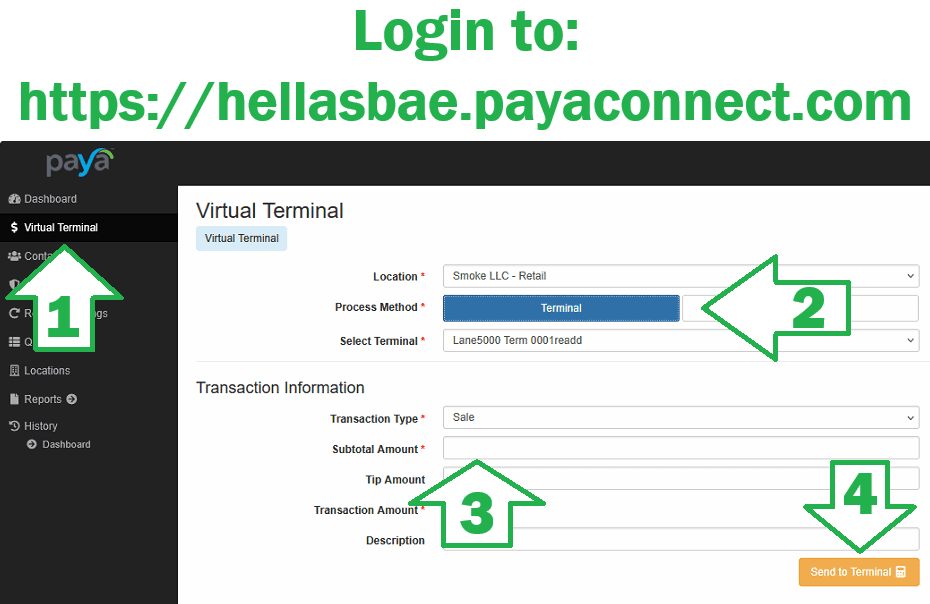
Go to hellasbae.payaconnect.com and sign in.
Don't know your login?
Click the FORGOT PASSWORDbutton on the login page and reset it first using the email address on file. If you don't know which email you used, go to your CC thread on WhatsApp and search that thread for "Location Admin Username"— Mitch already sent it to you. If you still can't find it, ask him in that thread.
- 1
Click Virtual Terminal
In the black menu down the left side of PayaConnect, click Virtual Terminal.
- 2
Set Process Method to Terminal
Choose your Location, click the Process Method button until it reads Terminal, then pick your terminal under Select Terminal (for example "Lane5000 Term 0001").
- 3
Enter a small Subtotal Amount
Leave Transaction Type on Sale and type a small amount such as 1.00 in the Subtotal Amount box. Leave Tip and Description blank.
- 4
Click Send to Terminal
The amount should appear on the credit card terminal within a few seconds. Tap or insert a card to finish the sale, then void or refund it so the customer is not charged. If nothing shows up on the terminal, it is not talking to the internet yet.
Nothing showed up on the terminal?
Check the wiring and terminal setup, or run through the Paya issue diagnostic.